MiniTool Partition Wizard Server 8
- Convert NTFS to FAT.
- Copy Dynamic disk volume.
- GPT Disk and MBR Disk interconversion.
- Copy UEFI boot disk.
- Convert GPT-style Dynamic Disk to Basic.
- Move Boot/System volume for Dynamic Disk.
Convert server partition
- Partition manager for server 2003
- Windows Server Manager
- Best disk partition software
- Best partition manager software
- Windows 2003 server partition manager
- Windows partition manager software
- Partition Manager Windows
- Partition manager server 2003
- Partition manager server edition
- Windows partition manager
- Server partition manager
Best disk partition software
Why need users convert disk type?
Many users may have experience on converting basic disk to dynamic disk. When users don't want to use dynamic disk, how to convert it back? Will you use Windows built-in disk management tool? As a matter of fact, if users want to use Windows disk management tool to convert a dynamic disk to basic disk, it must be on the premise that there is no data and partition existing on the hard disk. Take commonly seen Windows Server 2003 for example. Launching its disk management tool, users will see its main interface, as follows.
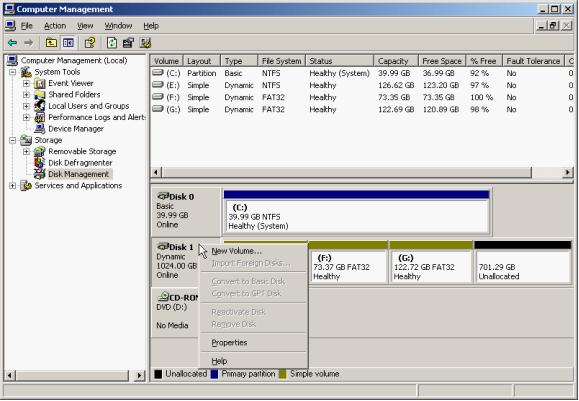
Select the dynamic disk on server and right click mouse. Users can see "Covert to Basic Disk" is inactivated from the menu popping up. Seen from this, Windows Server 2003 disk management tool can not convert dynamic disk to basic disk when there is any partition or data on the hard disk. If users want to realize the operation, disk partition software will be the best choice.
How to convert dynamic disk to basic disk with the best disk partition software?
Before converting dynamic disk to basic disk, please visit http://www.partitionmanagerserver.com/ to download the best disk partition software and install it to the computer. It can convert dynamic disk to basic disk without influencing partition data. The following picture shows its main interface.
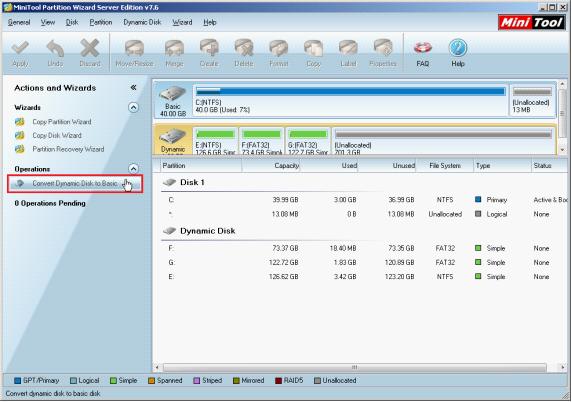
From the list in this interface, user can see disk and partition conditions. Please select the dynamic disk that will be converted and click "Convert Dynamic Disk to Basic". The following interface will be shown.
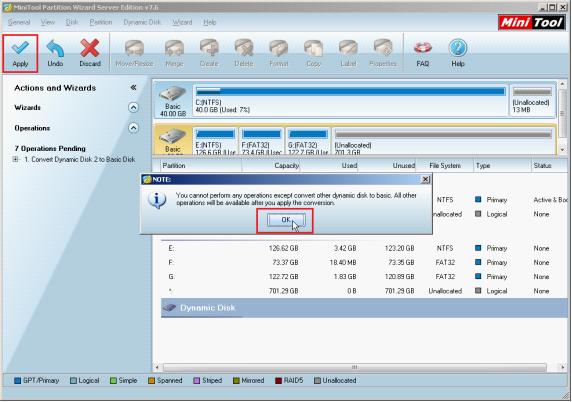
Confirm the operation and then click "OK" to go back to the main interface. After that, click "Apply" to perform the operation, finishing converting dynamic disk to basic disk.
Do you also want to convert dynamic disk to basic disk without influencing data? If you do, please visit the website to download the best disk partition software.
Many users may have experience on converting basic disk to dynamic disk. When users don't want to use dynamic disk, how to convert it back? Will you use Windows built-in disk management tool? As a matter of fact, if users want to use Windows disk management tool to convert a dynamic disk to basic disk, it must be on the premise that there is no data and partition existing on the hard disk. Take commonly seen Windows Server 2003 for example. Launching its disk management tool, users will see its main interface, as follows.
Select the dynamic disk on server and right click mouse. Users can see "Covert to Basic Disk" is inactivated from the menu popping up. Seen from this, Windows Server 2003 disk management tool can not convert dynamic disk to basic disk when there is any partition or data on the hard disk. If users want to realize the operation, disk partition software will be the best choice.
How to convert dynamic disk to basic disk with the best disk partition software?
Before converting dynamic disk to basic disk, please visit http://www.partitionmanagerserver.com/ to download the best disk partition software and install it to the computer. It can convert dynamic disk to basic disk without influencing partition data. The following picture shows its main interface.
From the list in this interface, user can see disk and partition conditions. Please select the dynamic disk that will be converted and click "Convert Dynamic Disk to Basic". The following interface will be shown.
Confirm the operation and then click "OK" to go back to the main interface. After that, click "Apply" to perform the operation, finishing converting dynamic disk to basic disk.
Do you also want to convert dynamic disk to basic disk without influencing data? If you do, please visit the website to download the best disk partition software.






















